
💬 WhatsApp username: customers write to you without a phone number
A new WhatsApp Business feature. Your number can now have a short username, for example @yourbrand. A customer types that name and lands straight in a chat with you, without knowing your phone number. The number stays in your profile and works exactly as before.
Why this is useful for your business
A short name instead of a long number: handy in ads, on a business card and in stories.
A customer can message you without knowing your phone number.
One recognizable brand across Instagram and WhatsApp.
Your phone number stays in the profile and keeps working.
⭐ Option 1 (recommended): through your WazzaBee account
The easiest way. If your WhatsApp Business runs through WazzaBee, you set the username in a couple of clicks right in your account, with no trip into Meta's settings.
What you need: a WhatsApp Business (WABA) channel connected in WazzaBee.
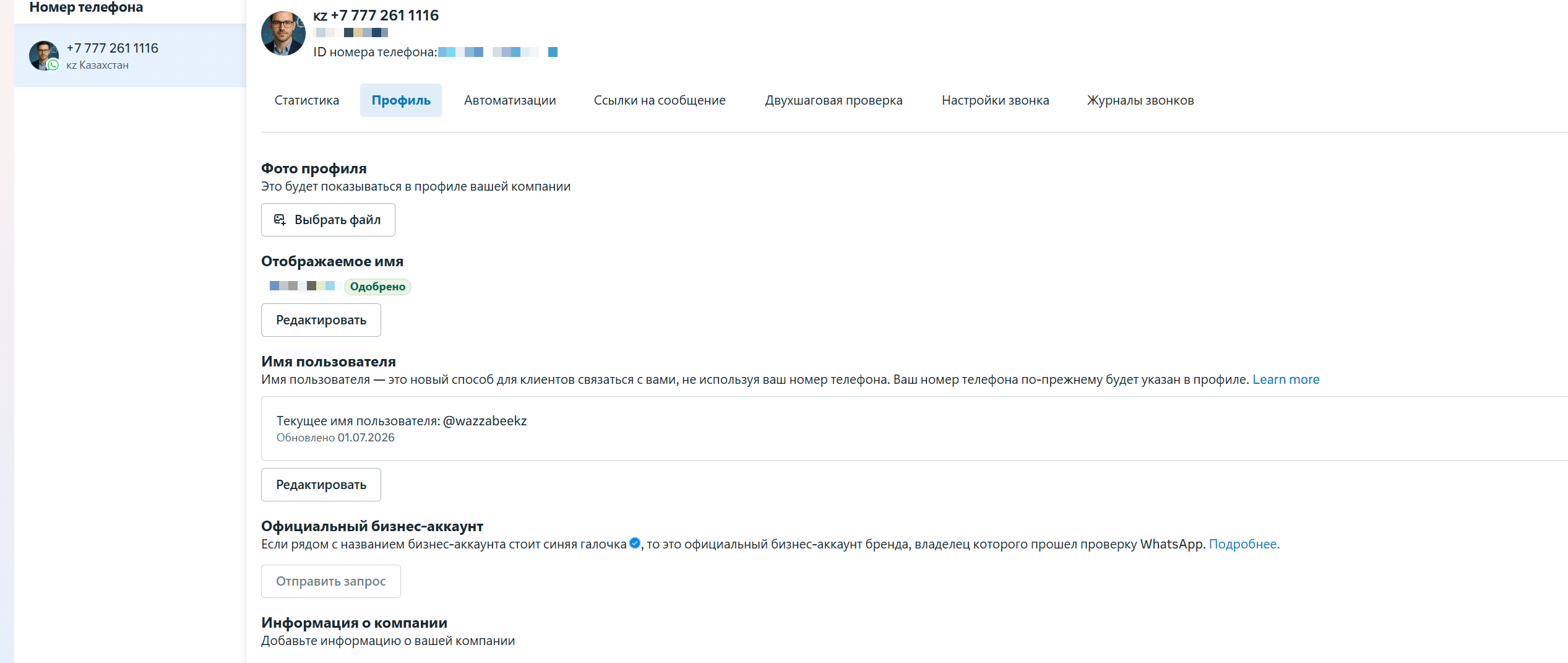
Log in to WazzaBee → the "Channels" section.
Open the WhatsApp Business channel you need → the "Profile" tab.
Find the "WhatsApp username" block.
Type the name you want (for example, mybrand) and click "Create".
You'll see "Current username: @mybrand". Done ✅
🐝 Not with us yet? Connect WhatsApp Business through WazzaBee and manage your username, profile, broadcasts and customer conversations from your CRM in one place. Connection takes 15 minutes. Learn more →
📱 Option 2: through the WhatsApp app
This works if your number runs in the regular WhatsApp app: that is, you are not on WABA yet, or you use coexistence mode, where the number lives in the app and in the WhatsApp Business API at the same time.
Open the WhatsApp app on your phone.
Go to Settings → your profile.
Find "Username" and set your username.
Save.
⚠️ If your number is on "pure" WABA (it doesn't open in the WhatsApp app), this option won't work. Use Option 1 (your WazzaBee account) or Option 3 (WhatsApp Manager).
🛠️ Option 3: through WhatsApp Manager (Meta)
For those who manage the number directly in Meta. Works for WABA numbers.
Open WhatsApp Manager (business.facebook.com → WhatsApp Manager).
In the left menu, choose Account tools → Phone numbers.
Pick the WhatsApp Business account you need (your number).
Open the "Profile" tab and find the "Username" block.
Click "Create" (or "Edit"), type the name and save.
🔗 If you get the "Link your Instagram" error
Sometimes when you save you get a message: "This username is already used by your Instagram account. Link Instagram to the number in your Meta Business settings, then try again."
It means the name you picked is already taken by your own Instagram account. WhatsApp asks you to confirm that the number and the Instagram account both belong to you. Here's what to do:
Open Meta Business (Business settings) of the portfolio your WhatsApp number is connected to.
Go to Accounts → Instagram accounts and add the Instagram account to that same portfolio.
Make sure the Instagram account is a professional (business) account and sits in the same portfolio as WhatsApp.
Link Instagram to your WhatsApp account.
💡 If the name is not taken by your Instagram, no linking is needed: the username is set right away.
FAQ
Question | Answer |
|---|---|
Which option should I choose? | If you're a WazzaBee customer with WABA connected: Option 1 (the fastest). A regular number or coexistence: Option 2. Managing everything yourself in Meta: Option 3. |
Will my number stop working? | No. The number stays in your profile and works as usual. |
Can I change the username later? | Yes, you can change or delete it at any time. |
Which characters are allowed? | Only lowercase Latin letters a–z, digits 0–9, a dot and an underscore. |
Is it available in Kazakhstan? | Yes, the feature works for Kazakhstan numbers. |
🐝 WazzaBee: a service that connects messengers with your CRM for businesses in Kazakhstan. WhatsApp, Instagram, Telegram and OLX in one CRM. Connect WhatsApp Business and create your username today. Connect →