
WhatsApp calls on your WhatsApp Business API line come straight into amoCRM. A manager answers in the WazzaBee call window on top of any amoCRM page, and the sound goes through the browser. After the conversation, the call with its duration and recording appears in the client's deal.
📋 What you need
- A WhatsApp Business API line with calls enabled.
- amoCRM connected to WazzaBee, with the line passed to amoCRM. How to do it: Connecting amoCRM.
- The amoCRM user's email matches the employee's email in the WazzaBee account Team. The widget uses it to know who should see the call.
- The employee is among those who receive calls: Calls → Settings, the Answering calls block.
- A browser with microphone access allowed.
⚙️ How to enable calls in amoCRM
- In your WazzaBee account, open Calls → Settings.
- For the line you need, in the Calls in amoCRM block, turn on Send calls to amoCRM.
- If there is no switch, the line is not connected to amoCRM yet. Click Open amoCRM settings and connect it.
- Open amoCRM and refresh the page. On the first call the browser asks for microphone access: allow it.
📞 Incoming call
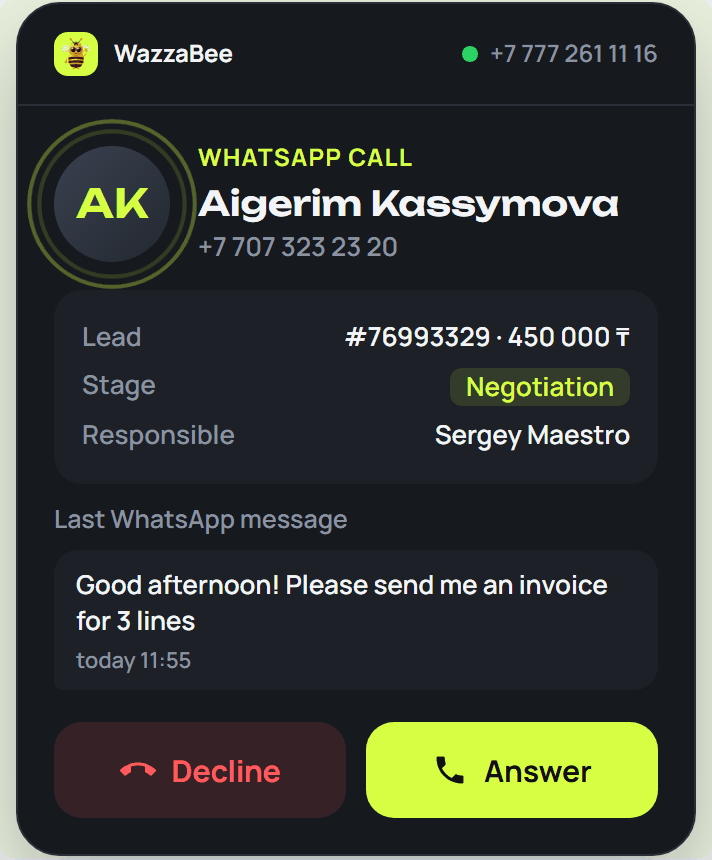
When a client calls on WhatsApp, a call window appears in the centre of the screen and a ringtone plays. The amoCRM page under the window keeps working. The window shows:
- the client's name and number, and the line they are calling;
- their deal: number, budget, stage and responsible user;
- the client's last WhatsApp message and when it arrived.
Click Answer to pick up, or Decline.
🎙 Conversation
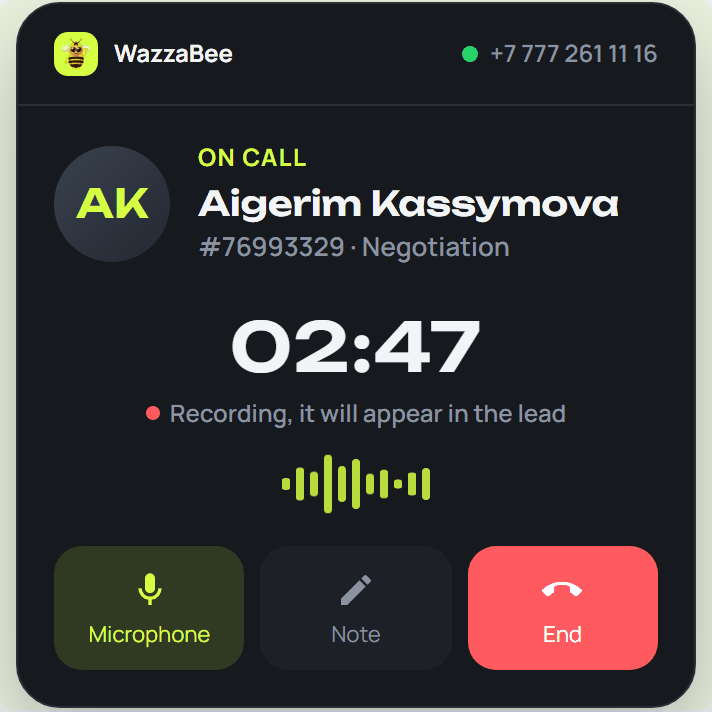
- The timer shows how long the call has lasted.
- The recording line is shown if call recording is enabled on the line.
- Microphone mutes and unmutes your sound.
- Note opens a text field. Click Save, and the note appears in the client's deal in amoCRM. If you did not save it before the call ended, the unfinished note is saved automatically.
- End finishes the call.
🔴 Missed call
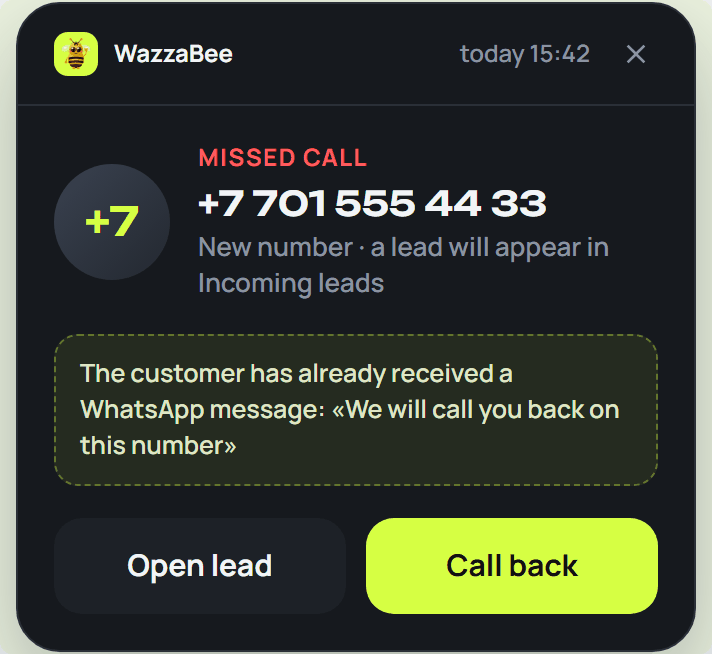
If the client hung up or nobody answered in time, the window shows a missed call with its time.
- A call from a new number creates a request in Incoming leads.
- If an auto-reply for missed calls is set up on the line, the window shows which message was sent to the client.
- Open request (or Open card, if the client already exists) takes you to the client, and Call back opens an outgoing call.
📲 How to call a client from the card
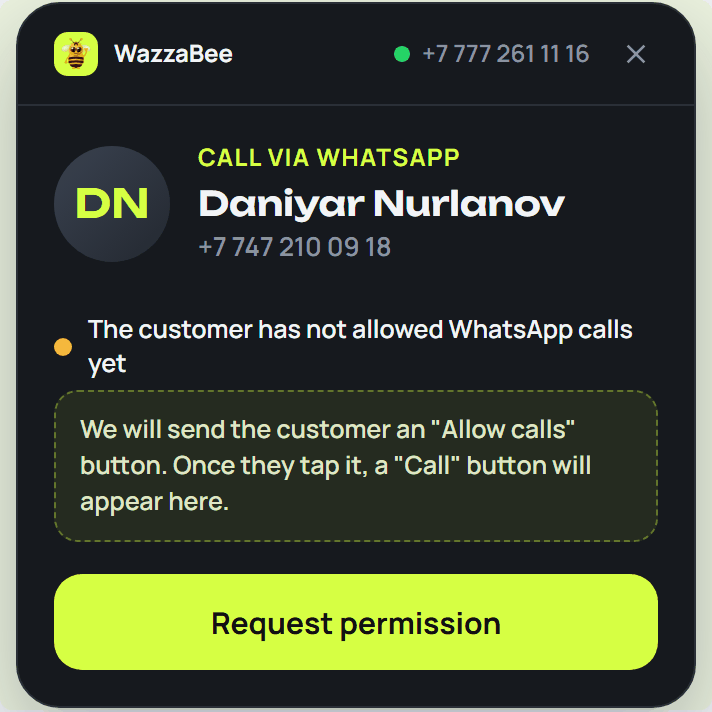
Calling on WhatsApp is only possible with the client's consent. So first the client receives a request, and the call button appears after they allow it.
- In a deal or contact card, click the client's phone number and choose Call on WhatsApp.
- If you have several lines, choose one in the Line field.
- If the client has not allowed calls yet, click Request permission. The client gets an Allow calls button in WhatsApp.
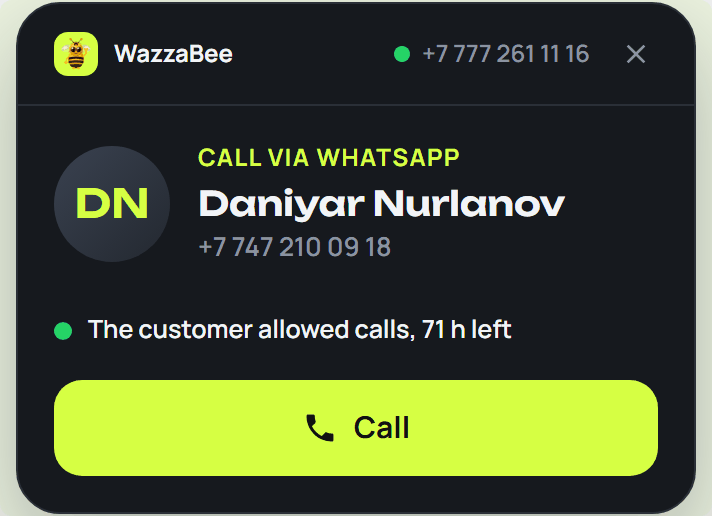
- Once the client allows it, the window shows that calls are allowed and a Call button. While open, the window checks the client's answer by itself.
- Click Call. While it rings, the window says Calling, and the conversation starts once the client answers.
📁 Where the call appears in amoCRM
- After the conversation, the call appears in the feed of the client's open deal: direction, duration and the recording with seeking.
- A call from a new number goes to Incoming leads.
- Notes from the call window are in the same deal.
❓ FAQ
The window says calls are unavailable because the amoCRM email does not match the WazzaBee employee email
In the WazzaBee account Team, set the same email the employee uses to sign in to amoCRM, or change the email in amoCRM.
The window says calls to amoCRM are not enabled on your lines
Turn on Send calls to amoCRM for the line: Calls → Settings.
The call window does not appear. What should I check?
Refresh the amoCRM page, check microphone access in the browser and that you are among those who receive calls. The call window works in the updated WazzaBee widget, and the update comes to amoCRM automatically. Calls still get into the cards, and you can answer them in the WazzaBee account.
The window says the browser did not give access to the microphone
Click the lock to the left of the amoCRM address, allow Microphone and refresh the page.
Can I call a client without their consent?
No, this is how WhatsApp works. Send a request first, and after the client allows it, the Call button appears.