
Menus and reply buttons without a template
With POST /v1/messages/send you can send the customer an interactive message: a list menu or reply buttons. No template and no Meta approval are needed. This is made for chatbots: the customer writes "Start", your bot replies with a menu.
Two kinds
| type | What the customer sees | Options |
|---|---|---|
list | One button under the message, for example "Open menu". Tapping it opens a list, the customer picks one item | up to 10 |
buttons | Buttons right under the message text | up to 3 |
What the customer sees
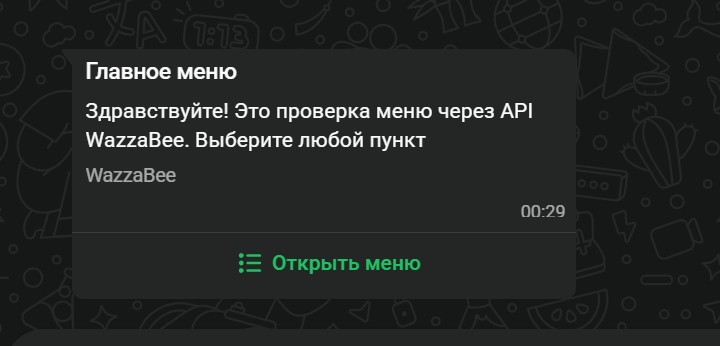
The menu message: heading, text, footer and the "Open menu" button.
Tapping it opens the list of items. Phone on the left, WhatsApp on a computer on the right.
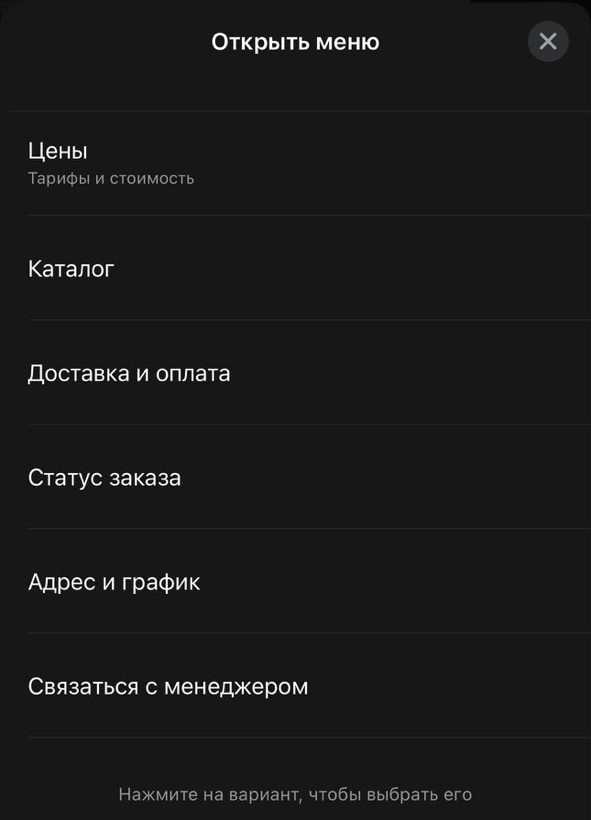
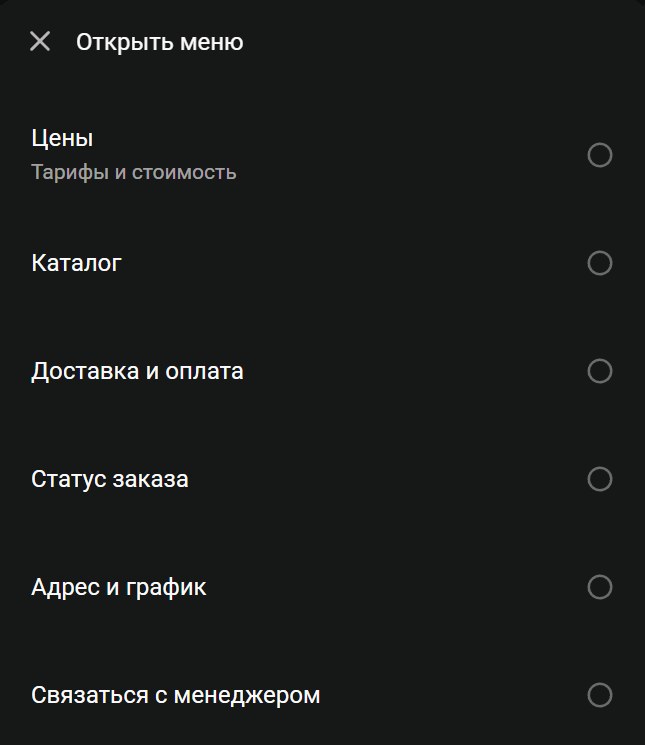
The customer taps an item, and the choice reaches your webhook with the item id.
When you can send it
- Only on WhatsApp Business API lines (
whatsapp_waba). For other lines the API returns 400. - Only within 24 hours of the customer's last message. This is a WhatsApp rule: outside the window you can only send a template. If the window is closed, WhatsApp rejects the message and the status webhook reports an error.
- A list menu cannot be added to a template or a broadcast, also a WhatsApp rule. A template can have up to 10 quick reply buttons: see Templates in the dashboard.
URL
POST https://api.wazzabee.com/api-gateway/v1/messages/sendHeaders
Authorization: Bearer YOUR_API_KEY
Content-Type: application/json
Fields of interactive
| Field | Type | Required | Description |
|---|---|---|---|
type | string | ✅ | list or buttons |
body | string | ✅ | Message text: up to 4096 characters for a menu, up to 1024 for buttons |
header | string | No | Heading above the text, up to 60 characters |
footer | string | No | Small print under the text, up to 60 characters |
button | string | ✅ for list | Label of the button that opens the menu, up to 20 characters |
rows | array | ✅ for list* | Menu items: id up to 200 characters, title up to 24, description up to 72 (optional). Up to 10 items in total |
sections | array | ✅ for list* | Items grouped in sections: { "title": "...", "rows": [...] }. Up to 10 sections, title up to 24 characters, required when there is more than one section. Up to 10 items in total |
buttons | array | ✅ for buttons | 1 to 3 buttons: id up to 256 characters, title up to 20 |
* For a menu pass either rows or sections.
The interactive field cannot be combined with text, mediaUrl or templateName: the message text goes into interactive.body. Item and button ids, as well as button labels, must be unique. Other request fields (channelId, chatId, campaignId, senderName, automated) work as usual, see Sending messages.
Example: a six-item menu
curl -X POST "https://api.wazzabee.com/api-gateway/v1/messages/send" \
  -H "Authorization: Bearer YOUR_API_KEY" \
  -H "Content-Type: application/json" \
  -d '{
    "channelId": "your-line-uuid",
    "chatId": "77071234567",
    "interactive": {
      "type": "list",
      "header": "Main menu",
      "body": "Hello! Please choose what you are interested in",
      "footer": "Open 9:00 to 19:00",
      "button": "Open menu",
      "rows": [
        { "id": "prices", "title": "Prices", "description": "Plans and costs" },
        { "id": "catalog", "title": "Catalog" },
        { "id": "delivery", "title": "Delivery and payment" },
        { "id": "order_status", "title": "Order status" },
        { "id": "address", "title": "Address and hours" },
        { "id": "manager", "title": "Talk to a manager" }
      ]
    }
  }'
Example: a menu with sections
"interactive": {
  "type": "list",
  "body": "Choose a service",
  "button": "Services",
  "sections": [
    { "title": "Haircuts", "rows": [
      { "id": "cut_men", "title": "Men's" },
      { "id": "cut_women", "title": "Women's" }
    ]},
    { "title": "Coloring", "rows": [
      { "id": "color_full", "title": "Full color" }
    ]}
  ]
}
Example: reply buttons
"interactive": {
  "type": "buttons",
  "body": "Do you confirm your appointment tomorrow at 10:00?",
  "buttons": [
    { "id": "confirm", "title": "Yes, I'll come" },
    { "id": "reschedule", "title": "Reschedule" },
    { "id": "cancel", "title": "Cancel" }
  ]
}
Response (202)
{
  "success": true,
  "queued": true,
  "queueId": "uuid",
  "campaignId": null,
  "message": "Сообщение поставлено в очередь на отправку"
}
Errors (400)
Limits are checked right away, before sending. If something is wrong, the API returns 400 and names the field to fix. Error texts are in Russian, for example:
{ "error": "В меню не больше 10 пунктов всего, сейчас 11" }
{ "error": "interactive.rows[2].title: не длиннее 24 символов" }
{ "error": "interactive доступен только для линий WhatsApp Business API (whatsapp_waba)" }
How to know what the customer chose
Turn on the messages_button subscription (see Webhooks). When the customer picks a menu item or taps a button, you receive an event:
{
  "buttons": [{
    "messageId": "uuid",
    "channelId": "uuid",
    "chatId": "77071234567",
    "contactId": "uuid",
    "conversationId": "uuid",
    "button": {
      "type": "list_reply",
      "id": "prices",
      "title": "Prices",
      "description": "Plans and costs"
    },
    "replyTo": {
      "messageId": "uuid",
      "queueId": "uuid",
      "campaignId": null,
      "broadcastId": null
    },
    "timestamp": "2026-10-03T12:00:00Z"
  }]
}
For a menu item button.type is list_reply, for a reply button it is button_reply. button.id holds your id, which makes it easy to continue the bot scenario. replyTo.queueId points to the send the customer replied to.
What the agent sees
In the dashboard chat the message shows as text with the menu items or buttons under it, the way the customer saw them. The customer's choice arrives in the chat as a regular incoming message with the item title.