
When a customer taps «Send message» on an Instagram or Facebook ad, an «From an ad» label appears next to their name in the chat. Click it to open the card of the ad that started the conversation.
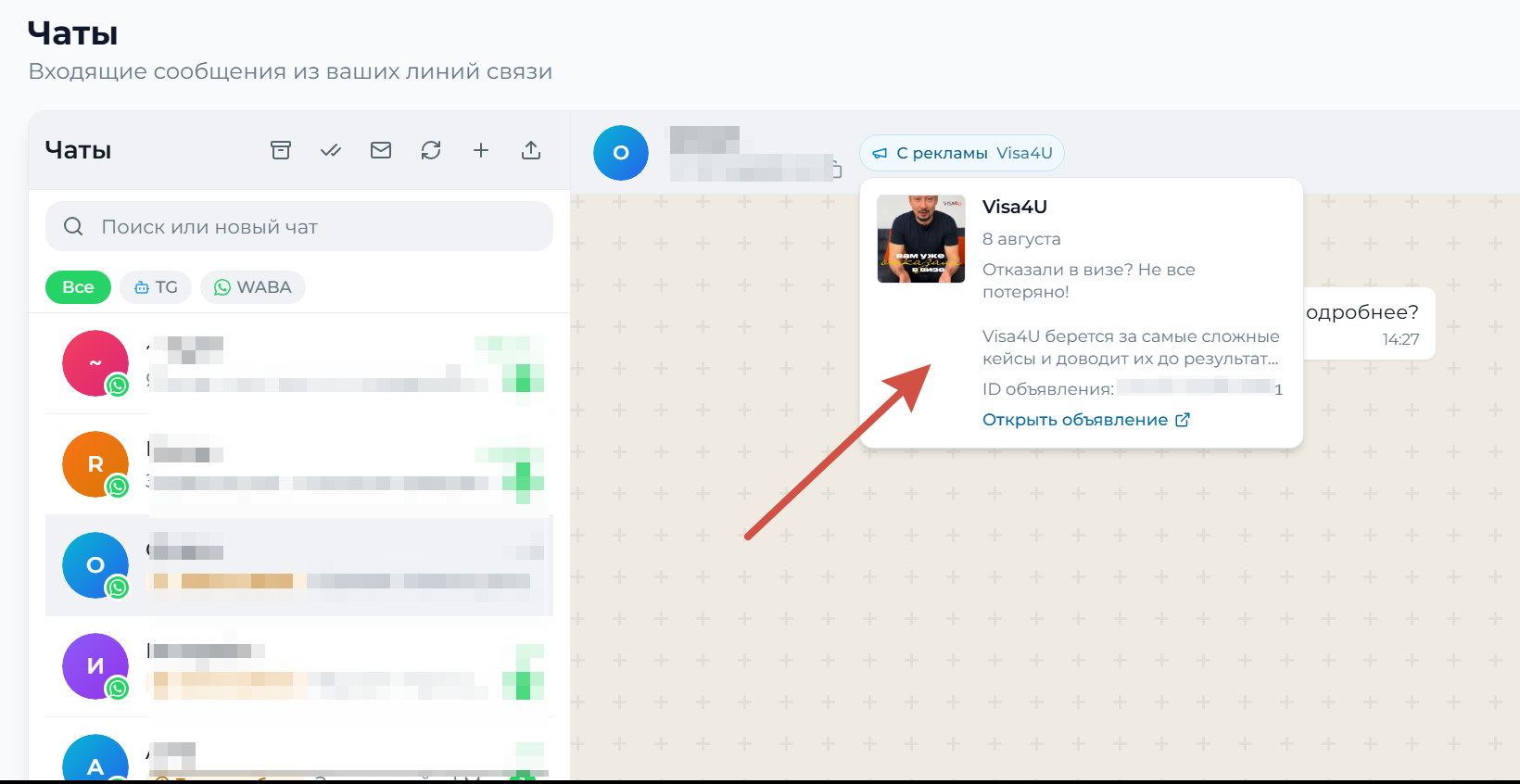
Where to look
The label sits in the conversation header, to the right of the customer name. It takes no space in the chat and shows up only where the customer really came from an ad.
What the card shows
- Ad name: the headline you set in the ad;
- date of the click: when the person tapped the ad;
- ad text and a preview of the image or video;
- ad ID: use it to find the ad in your ads manager;
- «Open the ad» link.
Why you sometimes see an ID instead of a name
WhatsApp sends us the ad headline, not the campaign name. Headlines often repeat across ads («Message us») or turn out to be technical. In that case we show the ad ID: it will lead you straight to the right ad in your ads manager.
When there is no label
- the customer wrote to you directly, not through an ad;
- the line is connected by QR code: this data is only passed to the official WhatsApp (WABA);
- the ad led to a website instead of WhatsApp.
Where else it works
The label is visible both in the WazzaBee dashboard and in the embedded chat inside your CRM: Bitrix24, amoCRM and the API connection.
Your history is already tagged. Earlier conversations that came from ads were processed automatically. There is nothing to open or set up.